
AutoDesk: from customer to printed invoice in under a minute.
Type the customer's mobile number, add the work, and print a professional invoice with your logo. AutoDesk keeps every customer, invoice and car plate in one place, on the counter computer and on every phone in the shop, so your team spends less time on paperwork and more time on customers.
Four steps at the counter
- 1
Find the customer
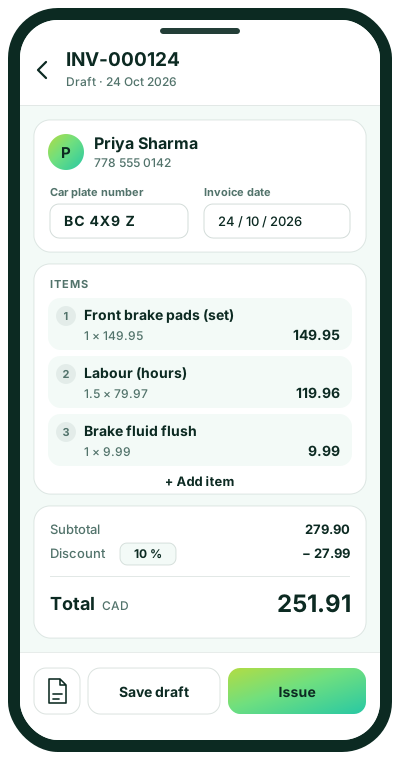
Type their mobile number. New customer? Add their name on the spot and they're saved for next time.
- 2
Add the work
Car plate, items, quantity and price, plus one discount for the whole job. Totals add up as you type.
- 3
Issue & print
Issue the invoice to give it its number, then print or share a clean PDF with your logo.
- 4
Watch the numbers
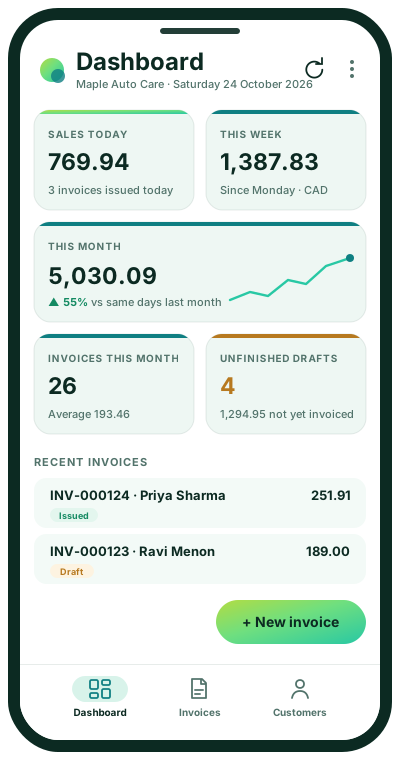
Today's sales, this week, this month and unfinished drafts, on the dashboard and on your phone.
Your business at a glance
Open the app in the morning and see exactly how the shop is doing, without waiting for an end-of-month report.
- Sales today, this week and this month, compared with last month
- Unfinished drafts, so no job is forgotten or left unbilled
- Top customers and best-selling items over the last 90 days
- A 30-day sales chart and the most recent invoices on the website
Built for busy service counters
Desk and phone, one system
The website for the counter and an app that installs on iPhone and Android, both showing the same live data.
Private to each business
Every company sees only its own customers and invoices. Strong sign-in with lockout after repeated wrong passwords.
You control who does what
Company admins add their team, reset passwords and switch mobile app access on or off for each person.
Totals you can trust
Every amount is calculated on the server, and two people editing the same invoice can never overwrite each other.
Find anything fast
Search by invoice number, car plate, customer name or mobile, and see each customer's full invoice history.
Ready to grow with you
One platform for many businesses and branches, built by FLOWZIX and ready to connect to your other tools.
Ideal for businesses that bill for work done
Join AutoDesk
Scan the code with your phone's camera to open the AutoDesk app and sign in.
- 1Scan the QR code with your phone
- 2Open the app
- 3Sign in with the username and password from your company admin
- 4Add AutoDesk to your home screen